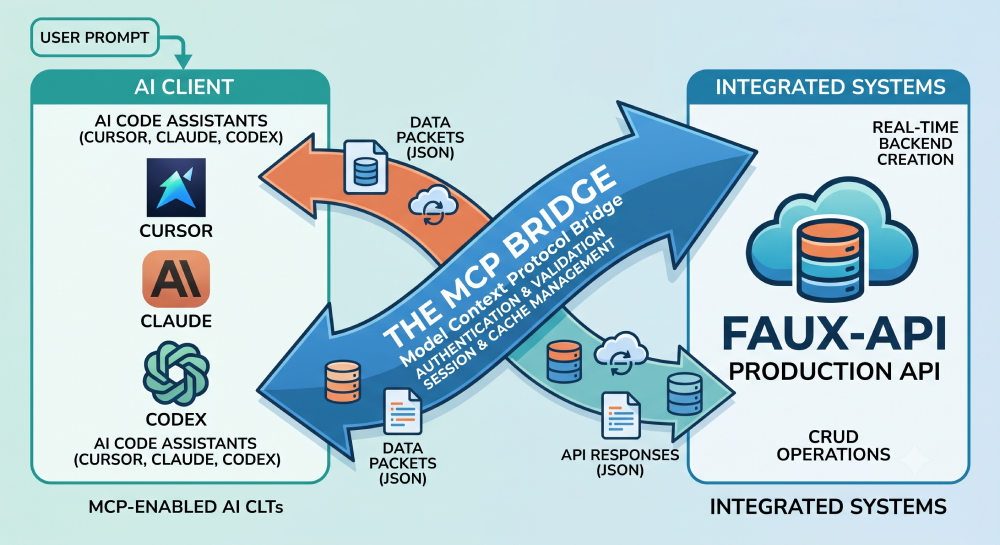
The Big Problem with Building Apps with AI
AI code tools like Cursor and Claude are amazing. You give the AI a simple idea, and it quickly builds a beautiful screen with buttons and colors.
But then, you run into a big problem: The Backend Wall.
To make a real app, you need a backend. A backend is like the hidden engine room of a house. It is where you save users’ data, passwords, and information. Usually, the AI wastes a lot of time writing thousands of lines of code just to build this hidden data engine.
Even worse, every time you ask the AI to change a small button on the screen, it forgets things and rewrites the whole backend code again. This wastes your AI limits, costs more money, and slows everything down.
Now, there is a much faster way to build apps. By connecting your AI directly to an automatic data helper called Faux-API, you never have to make the AI build a backend from scratch again.
With the Faux-API AI App Builder, you can get a live, working backend in less than 60 seconds just by asking for it.
What is Faux-API AI App Builder?
The Faux-API AI App Builder is a tool that links your AI helper directly to a ready-made online data center.
Instead of forcing your AI to code a database inside your computer files, you use a special bridge called MCP (Model Context Protocol).
What is MCP?
Think of MCP as a direct phone line between your AI tool and Faux-API. Instead of the AI spending hours building data storage, it just calls Faux-API and says, “Hey, make a data list for me.” Faux-API does it instantly.
Because Faux-API handles all the hard data storage, your AI tool can save its energy. It can focus 100% on making your app screens look beautiful and work perfectly.
Why People Love Using Faux-API
-
Saves Money and AI Brainpower: The AI doesn’t waste its limited memory writing boring database setup code over and over again.
-
Works with Everything: The data endpoints created by Faux-API work with any design tool you use to make your website, like React, Next.js, or Vue.
-
No Setup Headaches: You don’t need to download heavy database software or set up online servers just to test a simple app idea.
-
Easy to Grow: You can start with a free test version and switch to a real, permanent production version when your app gets real users.
How It Works in 3 Simple Steps
The whole system uses a very simple setup that takes less than a minute.
Step 1: Define (AI INPUT)
You type a simple sentence to your AI tool (like Cursor or Claude). For example, you say: “Create a real estate app database that saves house prices and locations.”
Step 2: Bridge (MCP BRIDGE)
The direct phone line (MCP) takes your words and passes the rules over to Faux-API automatically. You don’t have to copy or paste any code.
Step 3: Deploy (PROD-READY BACKEND)
Faux-API instantly builds the safe online data storage for you. In under a minute, your backend engine is live, and your AI is ready to build the front screen.
Choosing Your Mode: Testing vs. Production
Faux-API gives you two simple choices depending on what you are making.
-
Testing API Mode: This is best for quick practice, early ideas, and fast demos. It is completely free and works instantly without an account key.
-
Production API Mode: This is for real apps with active, living users. It saves your data safely forever and uses your personal account name and secret security token.
Cursor IDE Custom MCP Setup: 4 Steps to Live Backend
Setting up Faux API takes less than a minute. Follow these steps to connect your AI tool and start building immediately.
1
Link the MCP Server URL
Takes less than 30 seconds
Open your AI IDE settings (Cursor or Claude Desktop), choose Add Custom MCP, and enter the server URL.
http://mcp.faux-api.com/mcp
2
Prompt Your AI
Use natural English
Tell the AI what you want to build. Example: “Create a job portal backend with title, company, salary and location.”
3
Review the Generated Structure
Validate the response
Faux API creates the collections, endpoints, and sample data automatically.
4
Build Your Frontend
Production ready
Connect your React, Vue, Angular or Next.js application to the generated APIs and start building.
Now, just type a message like: “Connect to Faux-API and make a backend for a job board app. Include job titles and salaries.” The AI will build it for you immediately.
Frequently Asked Questions (FAQs)
1. What is MCP in simple words?
MCP is like a bridge or a direct phone line. It lets your AI tool talk directly to an external data helper (Faux-API) so the AI does not have to build data storage from scratch.
2. How does this save my AI limits?
Usually, AI wastes a lot of words (tokens) writing long database code. Since Faux-API handles that part instantly, the AI saves its memory to build your front screens.
3. Do I need to know how to code to use this?
No! You don’t need any backend coding skills. You just type what you want in normal, everyday English, and the tool sets it up.
4. What tools does this work with?
It works with any modern AI app creator that supports the new MCP standard, such as Cursor IDE and Claude Desktop.
Conclusion: Build Apps Faster Than Ever
Building software shouldn’t be slow or confusing. By using the Faux-API AI App Builder, you take away all the hard backend work.
Connect the free link (https://mcp.faux-api.com/mcp) to your AI tool today, type your idea, and watch your app come to life in 60 seconds!

